# Google Maps Scraper (`compass/crawler-google-places`) Actor
Extract data from thousands of Google Maps locations and businesses, including reviews, reviewer details, images, contact info, including full name, email, and job title, opening hours, prices & more. Export data, run via API, schedule and monitor runs, or integrate with other tools.
- **URL**: https://apify.com/compass/crawler-google-places.md
- **Developed by:** [Compass](https://apify.com/compass) (Apify)
- **Categories:** Lead generation, Travel
- **Stats:** 537,918 total users, 36,009 monthly users, 92.1% runs succeeded, 4,814 bookmarks
- **User rating**: 4.72 out of 5 stars
## Pricing
from $1.50 / 1,000 scraped places
This Actor is paid per event. You are not charged for the Apify platform usage, but only a fixed price for specific events.
Since this Actor supports Apify Store discounts, the price gets lower the higher subscription plan you have.
Learn more: https://docs.apify.com/platform/actors/running/actors-in-store#pay-per-event
## What's an Apify Actor?
Actors are web data automations that power AI and operations. They run on the Apify platform to scrape websites, process data, connect APIs, and automate workflows.
In Batch mode, an Actor accepts a well-defined JSON input, performs an action which can take anything from a few seconds to a few hours,
and optionally produces a well-defined JSON output, datasets with results, or files in key-value store.
In Standby mode, an Actor provides a web server which can be used as a website, API, or an MCP server.
Actors are written with capital "A".
## How to integrate an Actor?
If asked about integration, you help developers integrate Actors into their projects.
You adapt to their stack and deliver integrations that are safe, well-documented, and production-ready.
The best way to integrate Actors is as follows.
- **AI agents and MCP clients** — the [Apify MCP server](https://docs.apify.com/integrations/mcp.md) at `https://mcp.apify.com` (remote, streamable HTTP, OAuth on first use).
- **Agentic workflows and local Actor development** — [Agent Skills](https://apify.com/.well-known/agent-skills/index.json) with the [Apify CLI](https://docs.apify.com/cli/docs.md): `npm install -g apify-cli`, then `apify login`.
- **JavaScript/TypeScript projects** — the official [JS/TS client](https://docs.apify.com/api/client/js/docs.md): `npm install apify-client`.
- **Python projects** — the official [Python client](https://docs.apify.com/api/client/python/docs.md): `pip install apify-client`.
- **Any other language** — the [REST API](https://docs.apify.com/api/v2.md).
For usage examples, see the [API](#api) section below.
For more details, see Apify documentation as [Markdown index](https://docs.apify.com/llms.txt) and [Markdown full-text](https://docs.apify.com/llms-full.txt).
# README
### 📍 What is Google Maps Scraper?
**Google Maps Scraper** lets you extract business data from Google Maps, helping you generate leads, analyze competitors, and fuel growth with just a few clicks.
- **Generate qualified leads:** extract business names, websites, emails, and phone numbers to build prospect lists for your sales team
- **Track competitors across regions:** monitor where competitors operate, how they’re rated, and how many reviews they’ve received
- **Perform market analysis:** analyze market saturation, identify service gaps, or benchmark local businesses by size, rating, and visibility
- **Support partnerships:** discover top-rated or high-volume locations for outreach and collaboration
- **Automate research workflows:** replace manual search tasks with repeatable, workflows that keep datasets fresh and consistent.
**The scraper expands Google Maps data extraction beyond the limitations of the official [Google Places API](https://developers.google.com/maps/documentation/places/web-service/search) and bypasses the [limitation of Google Maps](https://blog.apify.com/google-places-api-limits/#%E2%9B%94-what-are-google-maps-limitations-for-scraping) of displaying (and scraping) no more than 120 places per area.**
#### What data does Google Maps Scraper extract?
| | |
| ------------------------------------------------------------------------------------------------------------ | ------------------------------------------------------------------------------------------------------- |
| 🔗 Title/place name | 📝 Subtitle, category, place ID, and URL |
| 📍 Address | 🌍 Location, plus code and exact coordinates |
| ☎️ Phone number | 🌐 Website, if available |
| 📝 Company contact details from website (company email, phone number and social media profiles) | 🎯 Business leads enrichment (full name, work email address, phone number, job title, LinkedIn profile) |
| 📱 Social media profile enrichment (detailed profile data for Facebook, Instagram, YouTube, TikTok, Twitter) | ➕ List of detailed characteristics (`additionalInfo`) |
| 🌐 Search results | 📊 Review count and review distribution |
| ⭐️ Average rating (`totalScore`) | 📸 List of images |
| 🏨 Hotel booking URL and price + nearby hotels | 🔒 Temporarily or permanently closed status |
| 🙋 Updates from customers & Questions and answers | 🔍 People also search |
| 🏷 Menu | 💲 Price bracket |
| 🧑🍳 Opening hours | ⌚️ Popular times - histogram & live occupancy |
| 🪑 Table reservation provider | 🛍 Multiple businesses located within indoor venues, such as malls or shopping centers. |
| 🤖 Competitor analysis report (add-on) | 🗺 Interactive map visualization of analyzed competitors |
For maximum usefulness, Google Maps Scraper has the following abilities:
- **Extract anything:** names, addresses, websites, phone numbers, ratings, review counts, categories, or opening hours
- **Flexible search:** scrape using any number of criteria, including search query, category, location, coordinates, or URL
- **Define the area to scrape:** focus on specific locations, or set a wide area using coordinates or geolocation parameters
- **Flexible output format:** export data into almost any format, with multiple views available
- **Integrate with other tools:** use webhooks or our MCP server to set up workflows with other Actors or third-party tools like Make or Zapier
- **Use add-ons for further enrichment:** use paid add-ons to further enrich your data with contact details, images, reviews, or an AI-powered competitor analysis report
***
### ⬇️ Input
The input for Google Maps Scraper should be **either a Google Maps URL or a location in combination with a search term.** You can also extract any details such as images, reviews, amenities, and so on. You can set up the input programmatically or use the fields in scraper’s interface.
#### Search terms
Using multiple similar search terms can increase the number of scraped places but it also increases the time a run takes. We recommend using a combination of search terms that are distinct or overlap only slightly in meaning. Using a long list of duplicate search terms will just increase the time of a run without providing more results.
Example of a good list of search terms: \[`restaurant`, `bar`, `pub`, `cafe`, `buffet`, `ice cream`, `tea house`]
Example of a bad list of search terms: \[`restaurant`, `restaurants`, `chinese restaurant`, `cafe`, `coffee`, `coffee shop`, `takeout`]
While Google search results often include categories adjacent to your search, e.g. `restaurant` might also capture some `cafe` or `bar` places, but you will get better results if you use them as separate search terms, as well.
#### Categories
**Using categories can be dangerous!**
Search terms can introduce false positives, extracting some irrelevant places. Categories can be used to narrow down the results to just the ones you select.
Categories can also be dangerous because they can cause false negatives, excluding places you might want in the results. Google has thousands of categories and many are synonymous. You must list all the categories you want to match, including all synonyms; for example, Divorce lawyer, Divorce service, and Divorce attorney are three distinct categories and some places might be classified as only one of them, meaning you should input all of them. For this reason, we recommend going through the categories list carefully. For some use cases, you might want to select as many as 100 categories to ensure you don't miss any relevant places.
To help with this, Google Maps Scraper tries to increase the chance of a match by doing the following:
- If any category of a place (each can have several categories) matches any category from your input, it will be included.
- If all words from your input are contained in a category name, it will be included. E.g. `restaurant` will match `Chinese restaurant` and `Pan Asian restaurant`.
> ⚠️ If categories are used **without search terms**, they will be used both as search terms and as category filters. However, for the above reasons, using categories without search terms is **not recommended**. We generally recommend fewer search terms and many categories.
#### Search without geolocation
Rather than using the standard search term and location inputs, you may also opt to use only the search term (e.g. "restaurants in berlin") or a direct Google Maps search URL (e.g. https://www.google.com/maps/search/restaurants/@52.5190603,13.388574,13z/) without the location input field. However, **this approach will limit the number of results to a maximum of 120** because it only opens a single map screen on Google with a finite scroll. We only recommend skipping location input if you don't need more than 120 results, you need the lowest possible latency, or you want to get the results in the same order as Google would provide.
#### Direct Place IDs or URLs
Alternatively, you can also upload a direct Google Maps Place ID or URL (or a list of them) to Google Maps Scraper, which will extract the place details directly without going through the search step first. Be aware that if you provide direct place IDs or URLs, you will be charged extra as this is part of a paid add-on, namely that for additional place details scraped.
***
### ⬆️ Output
The results will be wrapped into a dataset which you can find in the **Output** or **Storage** tab. Note that the output is organized in tables and tabs for viewing convenience. You can view results as a table, JSON, or as a map.
Once the run is finished, you can also download the dataset in various data formats (JSON, CSV, Excel, XML, HTML). Before exporting, you can pick or omit specific output fields; alternatively, you can also choose to download the whole view, which includes thematically connected data.
`Reviews` and `Leads enrichment` views spread each review or lead to a separate row for easier data processing.
#### Table view
The table view can be manipulated in different ways. There is a general overview, but you can also sort the table by contact info, location rating, reviews, or other fields.

#### JSON file
Here's the amount of data you'd get for a single scraped place ([this one 📍](https://www.google.com/maps/place/Kim's+Island/@40.5107736,-74.2482624,17z/data=!4m6!3m5!1s0x89c3ca9c11f90c25:0x6cc8dba851799f09!8m2!3d40.5107736!4d-74.2482624!16s%2Fg%2F1tmgdcj8?hl=en\&entry=ttu) so you can compare).
Example of 1 scraped restaurant in New York:
```json
{
"searchString": "Direct Detail URL: https://www.google.com/maps/place/Kim's+Island/@40.5107736,-74.2482624,17z/data=!4m6!3m5!1s0x89c3ca9c11f90c25:0x6cc8dba851799f09!8m2!3d40.5107736!4d-74.2482624!16s%2Fg%2F1tmgdcj8?hl=en&entry=ttu",
"rank": null,
"searchPageUrl": null,
"searchPageLoadedUrl": null,
"isAdvertisement": false,
"title": "Kim's Island",
"subTitle": null,
"description": null,
"price": "$10–20",
"categoryName": "Chinese restaurant",
"address": "175 Main St, Staten Island, NY 10307",
"neighborhood": "Tottenville",
"street": "175 Main St",
"city": "Staten Island",
"postalCode": "10307",
"state": "New York",
"countryCode": "US",
"website": "http://kimsislandsi.com/",
"phone": "(718) 356-5168",
"phoneUnformatted": "+17183565168",
"claimThisBusiness": false,
"location": {
"lat": 40.5107736,
"lng": -74.2482624
},
"locatedIn": null,
"plusCode": "GQ62+8M Staten Island, New York",
"menu": "http://kimsislandsi.com/",
"servicesLink": null,
"totalScore": 4.5,
"permanentlyClosed": false,
"temporarilyClosed": false,
"placeId": "ChIJJQz5EZzKw4kRCZ95UajbyGw",
"categories": ["Chinese restaurant", "Delivery Restaurant"],
"fid": "0x89c3ca9c11f90c25:0x6cc8dba851799f09",
"cid": "7838756667406262025",
"reviewsCount": 91,
"reviewsDistribution": {
"oneStar": 4,
"twoStar": 3,
"threeStar": 3,
"fourStar": 10,
"fiveStar": 71
},
"imagesCount": 28,
"imageCategories": ["All", "Menu", "Food & drink", "Vibe", "By owner", "Street View & 360°"],
"scrapedAt": "2024-11-28T12:28:50.519Z",
"reserveTableUrl": null,
"googleFoodUrl": null,
"hotelStars": null,
"hotelDescription": null,
"checkInDate": null,
"checkOutDate": null,
"similarHotelsNearby": null,
"hotelReviewSummary": null,
"hotelAds": [],
"openingHours": [
{
"day": "Monday",
"hours": "Closed"
},
{
"day": "Tuesday",
"hours": "11 AM to 9:30 PM"
},
{
"day": "Wednesday",
"hours": "11 AM to 9:30 PM"
},
{
"day": "Thursday",
"hours": "11 AM to 12 AM"
},
{
"day": "Friday",
"hours": "12 to 9:30 AM, 11 AM to 10:30 PM"
},
{
"day": "Saturday",
"hours": "11 AM to 10:30 PM"
},
{
"day": "Sunday",
"hours": "12 to 9:30 PM"
}
],
"peopleAlsoSearch": [
{
"category": "People also search for",
"title": "Island Kitchen Chinese",
"reviewsCount": 70,
"totalScore": 3.4
},
{
"category": "People also search for",
"title": "New Island",
"reviewsCount": 116,
"totalScore": 3.9
},
{
"category": "People also search for",
"title": "Islander Taste Chinese Restaurant",
"reviewsCount": 119,
"totalScore": 4.2
},
{
"category": "People also search for",
"title": "Kum Fung",
"reviewsCount": 168,
"totalScore": 3.8
}
],
"placesTags": [],
"reviewsTags": [
{
"title": "prices",
"count": 6
},
{
"title": "delivery",
"count": 4
},
{
"title": "spareribs",
"count": 3
},
{
"title": "dumpling",
"count": 2
},
{
"title": "lo mein",
"count": 2
}
],
"additionalInfo": {
"Service options": [
{
"Takeout": true
},
{
"Dine-in": true
}
],
"Popular for": [
{
"Lunch": true
},
{
"Dinner": true
},
{
"Solo dining": true
}
],
"Accessibility": [
{
"Wheelchair accessible entrance": true
},
{
"Wheelchair accessible seating": true
},
{
"Assistive hearing loop": false
},
{
"Wheelchair accessible parking lot": false
},
{
"Wheelchair accessible restroom": false
}
],
"Offerings": [
{
"Comfort food": true
},
{
"Healthy options": true
},
{
"Quick bite": true
},
{
"Small plates": true
}
],
"Dining options": [
{
"Lunch": true
},
{
"Dinner": true
}
],
"Amenities": [
{
"Restroom": false
}
],
"Atmosphere": [
{
"Casual": true
}
],
"Planning": [
{
"Accepts reservations": false
}
],
"Payments": [
{
"Credit cards": true
},
{
"Debit cards": true
},
{
"NFC mobile payments": true
},
{
"Credit cards": true
}
],
"Children": [
{
"Good for kids": true
}
]
},
"gasPrices": [],
"questionsAndAnswers": [],
"updatesFromCustomers": null,
"ownerUpdates": [],
"url": "https://www.google.com/maps/search/?api=1&query=Kim's%...",
"imageUrl": "https://lh5.googleusercontent.com/p/AF1Q...",
"kgmid": "/g/1tmgdcj8",
"webResults": [],
"parentPlaceUrl": null,
"tableReservationLinks": [],
"bookingLinks": [],
"images": [
{
"imageUrl": "https://lh5.googleusercontent.com/p/AF1Q...",
"authorName": "Sebastian Sinisterra (CitySeby)",
"authorUrl": "https://maps.google.com/maps/contrib/103...",
"uploadedAt": "2017-05-30T00:00:00.000Z"
}
],
"imageUrls": ["https://lh5.googleusercontent.com/p/AF1Q..."],
"reviews": [
{
"name": "Rocco Castellano",
"text": "Excellent food great service n always on time",
"textTranslated": null,
"publishAt": "a month ago",
"publishedAtDate": "2024-10-11T01:23:42.544Z",
"likesCount": 0,
"reviewId": "ChdDSUhNMG9nS0VJQ0FnSURuNV9DVnFRRRAB",
"reviewUrl": "https://www.google.com/maps/reviews/data=!4m8!14m7!1m6...",
"reviewerId": "108813127648936384314",
"reviewerUrl": "https://www.google.com/maps/contrib/108...",
"reviewerPhotoUrl": "https://lh3.googleusercontent.com/a-/ALV...",
"reviewerNumberOfReviews": 74,
"isLocalGuide": true,
"reviewOrigin": "Google",
"stars": 5,
"rating": null,
"responseFromOwnerDate": null,
"responseFromOwnerText": null,
"reviewImageUrls": [],
"reviewContext": {},
"reviewDetailedRating": {
"Food": 5,
"Service": 5,
"Atmosphere": 5
}
}
],
"userPlaceNote": null,
"restaurantData": {}
}
```
**🏢 Company contacts enrichment**
```json
{
"title": "Daniel's Jewelers",
"instagrams": ["https://www.instagram.com/danielsjewelers/"],
"facebooks": ["https://www.facebook.com/DanielsJewelers"],
"linkedIns": [],
"youtubes": ["https://www.youtube.com/channel/UCUgzkwhbbodMnOwDIPJj0_g"],
"tiktoks": ["https://www.tiktok.com/@DanielsJewelers"],
"twitters": ["https://twitter.com/danielsjewelers"],
"pinterests": ["https://www.pinterest.com/daniel_jewelers/"]
}
```
**👥 Business leads enrichment**
```json
{
"city": "Seattle",
"state": "Washington",
"personId": "2746893668571939229",
"firstName": "Benjamin",
"lastName": "White",
"fullName": "Benjamin White",
"linkedinProfile": "https://www.linkedin.com/in/benjamin-white-2562a3212",
"email": null,
"mobileNumber": null,
"headline": "Influencer a Content Creator (IG, TT)",
"jobTitle": "Sales Manager",
"department": ["Marketing"],
"industry": "Food&Beverage",
"seniority": ["entry"],
"country": "United States",
"photoUrl": "https://media.licdn.com/dms/image/v2/...",
"companyId": "23734538243567720",
"companyName": "Happy Eating",
"companyWebsite": "happyeating.com",
"companySize": "51 - 200",
"companyLinkedin": "https://www.linkedin.com/company/62543",
"twitter": null,
"companyCity": null,
"companyState": null,
"companyCountry": null,
"companyPhoneNumber": null
}
```
**✅ Add-on: Email verification**
When `verifyLeadsEnrichmentEmails` is enabled, each lead's email address is verified and an `emailVerification` object is added to the lead output. Requires business leads enrichment to be active.
**Charged (decisive results):**
- `ok` – Valid, deliverable email address
- `invalid` – Invalid or non-existent email address
- `disposable` – Disposable or temporary email address
**Not charged:**
- `catch_all` – The domain accepts all addresses; individual deliverability cannot be confirmed
- `unknown` – Verification result could not be determined
- `error` – Verification encountered a technical error
```json
{
"email": "james.hill@apify.com",
"quality": "good",
"result": "ok",
"subResult": "accepted_email",
"free": false,
"role": false,
"error": ""
}
```
**📱 Social Media Profile Enrichment**
When social media profile enrichment is enabled, Google Maps Scraper can enrich discovered social media URLs with detailed profile information (follower counts, descriptions, and verification status...). The enriched profiles are included directly in the place output.
**Important Notes:**
- Social media profile enrichment requires the **Company contacts enrichment feature to be enabled** (this is automatically enabled when you enable Social media profile enrichment)
- Each enriched social media profile is a separate billable event
- You can enable enrichment for specific platforms only (e.g., only Facebook and Instagram)
- All enrichment options are disabled by default
- Enriched profiles are available in the **Social profiles** output view tab
**🤖 Competitor analysis add-on**
When `enableCompetitorAnalysis` is enabled, the scraper caps the total scraped places to `maxCompetitorsToAnalyze` (default: 30, max: 100) across all search terms combined, runs an AI-powered analysis on all of them after the crawl finishes, and pushes a single report to the dedicated `competitorAnalysis` named dataset. Set `maxCompetitorsToAnalyze` to 0 to skip the analysis even if the flag is on.
> ⚠️ **Use a single, focused search term for best results.** The final report ranks and compares all collected places against each other - they need to be in the same business category and market segment (e.g. `italian restaurants Vienna`). Using multiple search terms that span different categories (e.g. `restaurants` + `coffee shops` + `hair salons`) will produce a meaningless comparison because the AI will rank and contrast fundamentally different types of businesses. Multiple search terms are fine if they all target the same segment (e.g. `sushi restaurants NYC` + `japanese restaurants NYC`).
Enabling this add-on automatically forces:
- Full place detail scraping for all places (`scrapePlaceDetailPage` is overridden to `true`)
- At least 100 reviews per place (overrides a lower `maxReviews` setting)
- Social media profile enrichment for all places
**Example cost: 100 competitors analyzed**
The table below shows the additional cost of enabling this add-on for 100 places, assuming 100 reviews per place and 1 social media profile found per place. The base `place-scraped` cost applies regardless of this add-on.
| Event | Count | FREE | SILVER |
| ------------------------------- | ------------ | ----------- | ---------- |
| Additional place details | 100 | $0.20 | $0.15 |
| Company contacts enrichment | 100 | $0.20 | $0.15 |
| Reviews (100 per place) | 10,000 | $5.00 | $3.70 |
| Social media profile enrichment | 100 profiles | $10.00 | $0.70 |
| Competitor analysis event | 100 | $2.50 | $1.80 |
| **Total** | | **~$17.90** | **~$6.50** |
Reviews are the largest cost driver. Social media profile enrichment on the FREE plan is priced significantly higher than on paid plans. The exact cost depends on how many social profiles are actually found per business.
The report covers:
- **Per-place analysis** - review-backed strengths, weaknesses, and unique selling propositions (each claim cited to a specific review); sentiment breakdown; social media presence summary
- **Comparative ranking** - all analyzed places ranked with justification
- **Aspect-by-aspect comparison** - who leads and who lags on dimensions like customer sentiment, price positioning, and operational quality
- **Strategic market overview** - main competitive battlegrounds, market opportunities, and threats
- **Map visualization** - interactive HTML map stored in the Key-Value Store
**🏩 External places (hotels)**
Google sometimes shows these places when searching in certain locations, mainly for hotels. They are however not regular places with pins on the map and offer only some of the regular output fields. These places are marked with 3 extra output fields:
```json
{
"url": "https://www.google.com/maps/place/Al Eairy Furnished Apartments Al Madinah 9/@24.48...",
"isExternalServicePlace": true,
"externalServiceProvider": "SuperTravel",
"externalId": "/g/11pkhzvq1s"
}
```
**🏩 Hotel-specific info**
```json
{
"hotelStars": "4-star hotel",
"hotelDescription": "This old-world-style luxury hotel is in a historic property that dates from 1874; it's a 1-minute walk from the Long Island Railroad and 19 miles from Manhattan.\n The posh rooms have flat-screen TVs, Italian furniture, Wi-Fi (surcharge) and 24-hour room service. Upgraded suites add kitchenettes and living areas, while some feature an additional bathroom and private outdoor patios.\n Perks include 25,000 sq ft of event space, an indoor pool, a spa and sauna, a fitness center and an upscale steakhouse, plus a seasonal patio bar, and lounge. Pet walking and feeding services are available. Parking is free.",
"checkInDate": "2025-06-14",
"checkOutDate": "2025-06-16",
"similarHotelsNearby": [
{
"name": "Residence Inn Long Island Garden City",
"rating": 4.4,
"reviews": 343,
"description": "3-star hotel for $106 less",
"price": "$314"
}
],
"hotelAds": [
{
"title": "The Garden City Hotel",
"googleUrl": "https://www.google.com/travel/clk?pc=AA8...",
"isOfficialSite": true,
"price": "$501",
"url": "https://linkcenter.derbysoftca.com/dplatform-linkcenter/booking..."
}
]
}
```
**🍽️ Restaurant-specific info**
```json
{
"price": "$$",
"menu": "https://www.carminesnyc.com/menus/menus-clv-q420-dining",
"reserveTableUrl": "https://www.google.com/maps/reserve/v/dine/...",
"tableReservationLinks": [
{
"name": "carminesnyc.com",
"url": "https://www.carminesnyc.com/locations/times-square"
}
],
"bookingLinks": [],
"restaurantData": {
"tableReservationProvider": {
"name": "Resy",
"reserveTableUrl": "https://www.google.com/maps/reserve/v/dine/...r"
}
}
}
```
#### **Map view**
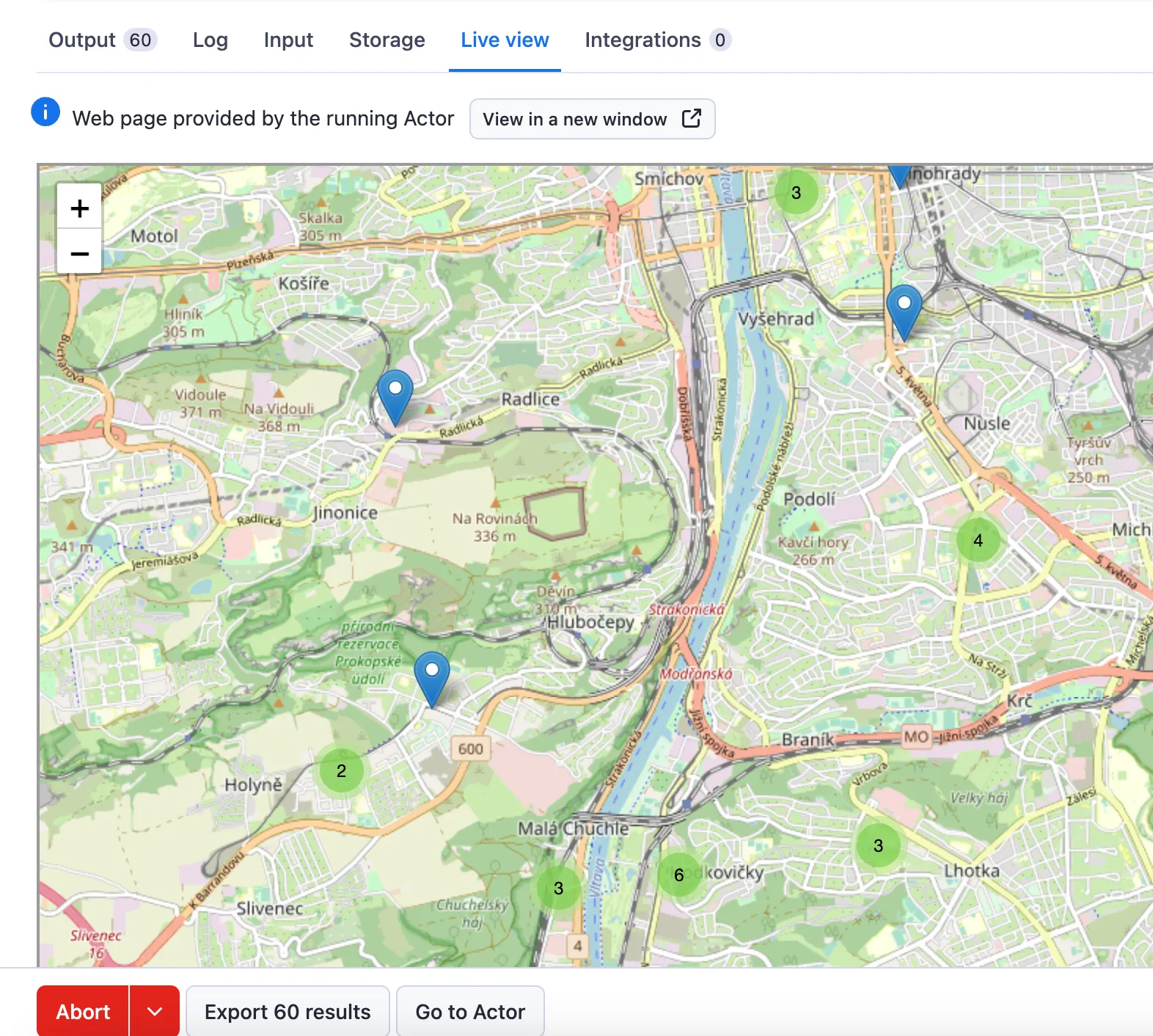
Google Maps Scraper provides a zoomable map that shows all the places scraped. The map is shown in the `Live View` tab on the actor run page and also stored in the Key-Value Store as `results-map.html` record.
***
### 📍📡 Using geolocation for pinpoint accuracy
#### Location, country, state, county, city, and postal code
Using free text in **Location** field should normally be enough to start scraping. For a more precise search, you can also use the **Geolocation parameters** field and use a combination of `country`, `state`, `county`, `city`, and `postalCode`.
Google Maps Scraper uses Open Street Map as its geolocation API. You can easily check the location matching your geolocation input on the [official Open Street Map page](https://nominatim.openstreetmap.org/ui/search.html?city=new%20york).
#### 🛰 Custom search area
If your location can’t be found on Google Maps or you want to customize it for a specific area, you can use the **Custom search area** function. You’ll have to provide coordinate pairs for an area and the scraper will create start URLs out of them. As an example, see the `geojson field` in [Nominatim Api](https://nominatim.openstreetmap.org/) ([example of Cambridge in Great Britain](https://nominatim.openstreetmap.org/search?country=united%20kingdom\&state=\&city=cambridge\&postalcode=\&format=json\&polygon_geojson=1\&limit=1\&polygon_threshold=0.005)).
There are several types of search area geometry that you can use in Google Maps Scraper: `Polygon`, `MultiPolygon` and `Point` (a circle with a radius of 5 kilometers by default). All of them follow the official [Geo Json RFC](https://datatracker.ietf.org/doc/html/rfc7946#section-3.1.2) and all types are supported. We’ve found the polygons and circle to be the most useful ones when it comes to scraping.
> Note that the order of longitude and latitude is reversed in GeoJson 🔄 compared to the Google Maps website. The first field must be longitude ↕️, the second field must be latitude ↔️.
We recommend using [Geojson.io](https://geojson.io/#map=2/0/20) to create `customGeolocation` of any type/shape in correct format. You can [watch this video](https://www.tiktok.com/@apifytech/video/7231446296006020379?embed_source=121352282%2C121351166%2C121331973%2C120811592%2C120810756%3Bnull%3B) on how to use it together with our scraper.
**💠 Polygon**
The most common type is a polygon, which is a set of points that define the scraped area. Note that **the first and last pair of coordinates must be identical** (to close the polygon). This example covers most of the city of London, UK:
```json
{
"type": "Polygon",
"coordinates": [
[
[
// Must be the same as last one
-0.322813, // Longitude
51.597165 // Latitude
],
[-0.31499, 51.388023],
[0.060493, 51.389199],
[0.051936, 51.60036],
[
// Must be the same as the first one
-0.322813, 51.597165
]
// ...
]
]
}
```
**💠💠 MultiPolygon**
MultiPolygon can combine more polygons that are not contiguous (for example, an island close to the mainland). Same as with the polygon, make sure the first and the last pair of coordinates in each polygon are identical.
```json
{
"type": "MultiPolygon",
"coordinates": [
[
// first polygon
[
[
12.0905752, // Longitude
50.2524063 // Latitude
],
[12.1269337, 50.2324336]
// ...
]
],
[
// second polygon
// ...
]
]
}
```
**🔘 Circle**
For a circle, we can use the `Point` type with our custom parameter `radiusKm`. Don't forget to change the radius to fit your needs. This example covers the city of Basel in Switzerland:
```json
{
"type": "Point",
"coordinates": ["7.5503", "47.5590"],
"radiusKm": 8
}
```
***
### ❓FAQ
#### How does Google Maps Scraper work?
It works exactly as if you were searching through Google Maps and copying information from each page you find. It opens the Google Maps website, goes to a specified location, then writes your search query into the search bar. Then it scrolls down until it reaches the end of the scroll bar or `maxCrawledPlacesPerSearch`. It enqueues all the places as separate pages and then copypastes all visible data into an organized document. This process is repeated for many map pages inside the input location. To understand the process fully, just try it out in your browser - the scraper does exactly the same thing, only much faster.
#### What are the disadvantages of the Google Maps API?
With the Google Maps API, you get $200 worth of credit usage every month free of charge. That means 28,500 map loads per month. However, the Google Maps API caps your search results to 60, regardless of the radius you specify. So, if you want to scrape data for bars in New York, for example, you'll get results for only 60 of the thousands of bars in the area.
**Google Maps Scraper imposes no rate limits or quotas** and provides more cost-effective, comprehensive results, and also scrapes histograms for popular times, which aren't available in the official API.
#### Can I scrape places from multiple locations?
In most cases, you don't need multiple locations at all. A single broad location, such as an entire country or state, works fine on its own, since Google Maps Scraper automatically covers the whole area for you instead of requiring you to search city by city or neighborhood by neighborhood.
Google Maps Scraper does support only a single location query per run, so if you genuinely need separate, non-contiguous locations (e.g. Paris and Tokyo in the same run), you can use [Google Maps Scraper Orchestrator](https://apify.com/lukaskrivka/google-maps-scraper-orchestrator) to scrape multiple locations with a single list. It will automatically run Google Maps Scraper for each location in the list and merge the results, and it also fully uses your Apify account memory for maximum speed. If you want to use only Google Maps Scraper, you can add multiple locations using `customGeolocation` with multiple polygons.
#### How can I increase the speed of the scraper?
You can increase the run memory up to 8 GB per run. To speed up the scraping even more, you can run several runs at once to fully utilize all your account memory. To make this simpler, you can use the [Google Maps Scraper Orchestrator](https://apify.com/lukaskrivka/google-maps-scraper-orchestrator) to split locations or search terms over multiple runs, deduplicate the results and collect them to a single dataset.
#### Can I use the Google Maps Scraper to extract Google reviews?
Yes. This Google Maps Scraper also supports the extraction of detailed information about reviews on Google Maps. Note that personal data extraction about reviewers is also possible but has to be **explicitly** enabled in input (see the [Legality of scraping Google Maps](https://apify.com/compass/crawler-google-places#is-it-legal-to-scrape-google-maps) section).
| | |
| --------------------------------- | ------------------------------- |
| 📝 Review text | 📅 Published date |
| 🌟 Stars | 🆔 Review ID & URL |
| ✅ Response from the owner - text | 📷 List of review images |
| 💬 Review context | 📊 Detailed rating per service |
| 🧛 Reviewer’s name | ✍️ Reviewer’s number of reviews |
| 🖼 Reviewer’s ID, URL & photo | 👋 `IsLocalGuide` |
#### How can I get one review per row in the output?
If you need to view reviews in a table with each review in a separate row, you can click on the **Reviews (if any)** Export dataset view.
To use this view via API, you need to add `&view=reviews` to the dataset export URL. E.g. `https://api.apify.com/v2/datasets/DATASET_ID/items?clean=true&format=json&view=reviews`
If you don't use the **Reviews (if any)** view, each output place item will contain a maximum of 5,000 reviews (in table format, it means a lot of columns). So if there are more reviews for that place, a duplicate place will be stored with the next 5,000 reviews, and so on. For instance, in a case of 50,000 reviews, the resulting dataset will have 10 items for the same place. We have this limitation due to the size limit of a single item in the Apify dataset.
#### Can I integrate Google Maps Scraper with other apps?
Yes. The Google Maps Scraper can be connected with almost any cloud service or web app thanks to [**integrations**](https://apify.com/integrations) on the Apify platform. You can **integrate your Google Maps data with Zapier, Slack, Make, Airbyte, GitHub, Google Sheets, Asana, LangChain** and more.
You can also use [**webhooks**](https://docs.apify.com/integrations/webhooks) to carry out an action whenever an event occurs, for example, get a notification whenever Google Maps Scraper successfully finishes a run.
#### **Can I use Google Maps Scraper as its own API?**
Yes, you can use the Apify API to access Google Maps Scraper programmatically. The API allows you to manage, schedule, and run Apify actors, access datasets, monitor performance, get results, create and update actor versions, and more.
To access the API using Node.js, you can use the `apify-client` [NPM package](https://apify.com/compass/crawler-google-places/api/client/nodejs).
To access the API using Python, you can use the `apify-client` [PyPI package](https://apify.com/compass/crawler-google-places/api/client/python).
For detailed information and code examples, see the [**API tab**](https://apify.com/compass/crawler-google-places/api) or refer to the [**Apify API documentation**](https://docs.apify.com/api/v2).
#### Can I use this Google Maps Scraper API in Python?
Yes, you can use the Apify API with Python. To access the Google Maps Scraper [API with Python](https://apify.com/compass/crawler-google-places/api/client/python), use the `apify-client` PyPI package.
You can find more details about the client in our [Python Client documentation](https://docs.apify.com/api/client/python/).
#### What are other tools I can use with Google Maps?
Use the dedicated scrapers below and combine them with Google Maps Scraper for more comprehensive analysis.
| | |
| ----------------------------------------------------------------------------------------------------- | ------------------------------------------------------------------------------------------------------ |
| 🪢 [Google Maps Scraper Orchestrator](https://apify.com/lukaskrivka/google-maps-scraper-orchestrator) | ⭐️ [AI Text Analyzer for Google Reviews](https://apify.com/geneea-analytics/reviews-text-nlp-analyzer) |
| [🤖 Competitor Analysis Agent](https://apify.com/apify/competitor-analysis-agent) | [🤖 Market Expansion Agent](https://apify.com/apify/market-expansion-agent) |
#### Is it legal to scrape Google Maps data?
Web scraping is legal if you are extracting publicly available data which is most data on Google Maps. However, you should **respect boundaries such as personal data** and intellectual property regulations. You should only scrape personal data if you have a legitimate reason to do so, and you should also factor in Google's [Terms of Use](https://policies.google.com/terms?hl=en).
***
#### Your feedback
We’re always working on improving the performance of our Actors. So if you’ve got any technical feedback for Google Maps Scraper or simply found a bug, please create an issue on the Actor’s [Issues tab](https://apify.com/compass/crawler-google-places/issues/open).
# Actor input Schema
## `searchStringsArray` (type: `array`):
Type what you'd normally search for in the Google Maps search bar, like English breakfast or pet shelter. Aim for unique terms for faster processing. Using similar terms (e.g., bar vs. restaurant vs. cafe) may slightly increase your capture rate but is less efficient.
⚠️ Searching for a specific place? If you're looking for a particular business or location (e.g., M\&M Indian Thai Halal Restaurant), make sure to also specify the city or country in the 📍 Location field below to get more accurate and reliable results. Without location context, Google Maps may return results from unexpected areas.
⚠️ Heads up: Adding a location directly to the search, e.g., restaurant Pittsburgh, can limit you to a maximum of 120 results per search term due to Google Maps' scrolling limit.
You can also use direct place IDs here in the format place\_id:ChIJ8\_JBApXMDUcRDzXcYUPTGUY. See the [detailed description](https://apify.com/compass/crawler-google-places#search-terms).
## `locationQuery` (type: `string`):
Define location using free text. Simpler formats work best; e.g., use City + Country rather than City + Country + State.
🌍 You can just set the whole country or state as the location: Google Maps Scraper intelligently splits it into subregions internally, so there's no need to search city by city or neighborhood by neighborhood yourself.
Verify with the OpenStreetMap webapp for visual validation of the exact area you want to cover.
💡 Pro tip: Always specify a location when searching for specific place names in the 🔍 Search terms field above. This helps narrow down results to the geographic area you're interested in and prevents getting results from unrelated locations.
⚠️ Automatically defined City polygons may be smaller than expected (e.g., they don't include agglomeration areas). If you need to define the whole city area, head over to the 📡 Geolocation parameters\* section instead to select Country, State, County, City, or Postal code.
For an even more precise location definition (especially when using City name as a starting point), head over to 🛰 Custom search area section to create polygon shapes of the areas you want to scrape. Note that 📍 Location settings always take priority over 📡 Geolocation\* (so use either section but not both at the same time).
For guidance and tricks on location definition, check our tutorial.
## `maxCrawledPlacesPerSearch` (type: `integer`):
Number of results you expect to get per each Search term, Category or URL. The higher the number, the longer it will take.
If you want to scrape all the places available, leave this field empty or use this section 🧭 Scrape all places on the map\*.
## `language` (type: `string`):
Results details will show in this language.
## `categoryFilterWords` (type: `array`):
You can limit the places that are scraped based on the Category filter; you can choose as many categories for one flat fee for the whole field. ⚠️ Using categories can sometimes lead to false negatives, as many places do not properly categorize themselves, and there are over 4,000 available categories which Google Maps has. Using categories might filter out places that you’d like to scrape. To avoid this problem, you must list all categories that you want to scrape, including synonyms, e.g., divorce lawyer, divorce attorney, divorce service, etc. See the [detailed description](https://apify.com/compass/crawler-google-places#categories).
## `searchMatching` (type: `string`):
Restrict what places are scraped based on matching their name with provided 🔍 Search term. E.g., all places that have chicken in their name vs. places called Kentucky Fried Chicken.
## `placeMinimumStars` (type: `string`):
Scrape only places with a rating equal to or above the selected stars. Places without reviews will also be skipped. Keep in mind, filtering by reviews reduces the number of places found per credit spent, as many will be excluded.
## `website` (type: `string`):
Use this to exclude places without a website, or vice versa. This option is turned off by default.
## `skipClosedPlaces` (type: `boolean`):
Skip places that are marked as temporary or permanently closed. Ideal for focusing on currently open places.
## `scrapePlaceDetailPage` (type: `boolean`):
Scrape detail pages of each place the Actor finds. This will slow down the Actor since it needs to open another page for each place individually.
The fields available only when scrapePlaceDetailPage is enabled include: `reviewsDistribution`, `reviewsRemovedNotice`, `imageCategories`, popularTimes fields, `openingHours`, `BusinessConfirmationText`, `peopleAlsoSearch`, `reviewsTags`, `updatesFromCustomers`, `questionsAndAnswers`, `tableReservationLinks`, `ownerUpdates` and hotel fields.
Enabling this also ensures that `reviewsCount` will be scraped.
This option needs to be enabled if you wish to use any of the options below.
## `scrapeTableReservationProvider` (type: `boolean`):
Scrape table reservation provider data like name, address, email or phone. This data is present only in restaurants that have blue "RESERVE A TABLE" button
## `scrapeOrderOnline` (type: `boolean`):
Scrape the 'Order online' section of restaurants to get pickup and delivery providers (Uber Eats, DoorDash, etc.), along with fees and estimated times.
## `includeWebResults` (type: `boolean`):
Extract the "Web results" section located at the bottom of every place listing.
## `scrapeDirectories` (type: `boolean`):
Some places (e.g. malls) can have multiple businesses located inside them. This option will scrape inside the "Directory" or "At this place" as per different categories (example here). Turn this toggle on to include those places in your results.
⚠️ Note that that full place details needs to be scraped in order to scrape directories.
## `maxQuestions` (type: `integer`):
Set the number of questions per place you expect to scrape. If you fill in 0 or leave the field empty, only the first question and answer will be scraped. To extract all questions, type 999 into the field.
⚠️ Note that some of the fields contain personal data.
## `scrapeContacts` (type: `boolean`):
Enrich Google Maps places with contact details extracted from the business website, including business emails and social media profiles (Meta, LinkedIn, X, etc).
Significant discounts are available on higher-tier plans. Please see the Pricing tab for your exact rate based on your subscription.
We exclude contacts of big chains: mcdonalds, starbucks, dominos, pizzahut, burgerking, kfc, subway, wendys, dunkindonuts, tacobell.
## `scrapeSocialMediaProfiles` (type: `object`):
Enable enrichment for any social media profiles found. This add-on retrieves detailed public data for each profile, including profile names, follower/following counts, descriptions, post/video counts, and verification status.
Pricing depends on your subscription plan (please see the 'Pricing' tab for details). You are charged a flat rate for the total number of profiles enriched, regardless of how many platforms (Facebook, YouTube, etc.) you select.
Feature Dependency:
To use this feature, the '⏩ Add-on: Company contacts enrichment (from website)' option will be automatically enabled. This ensures that all enriched social media data is correctly combined with the main contact record for each domain.
Output: Enriched profiles are available in the Social profiles output view tab.
## `maximumLeadsEnrichmentRecords` (type: `integer`):
Enrich your results with detailed contact and company information, including employee names, job titles, emails, phone numbers, LinkedIn profiles, and key company data like industry and number of employees.
This setting allows you to set the maximum number of leads records you want to scrape per each place found on the map (that has a website). By default, it's set to 0 which means that no leads information will be scraped.
⚠️ Note that some of the fields contain personal data. GDPR protects personal data in the European Union and by other regulations around the world. You should not scrape personal data unless you have a legitimate reason to do so. If you're unsure whether your use case is legitimate, please consult an attorney.
We exclude leads of big chains as these are not related to the local places: mcdonalds, starbucks, dominos, pizzahut, burgerking, kfc, subway, wendys, dunkindonuts, tacobell.
⚠️ Cost warning: This is a multiplier. Requesting 10 leads for 1,000 places will attempt to find 10,000 total leads. You are only charged for leads successfully found.
## `leadsEnrichmentDepartments` (type: `array`):
You can use this filter to include only specific departments (like Sales, Marketing, or C-Suite). Note: This will only work if the ⏩ Add-on: Extract business leads information - Maximum leads per place (maximumLeadsEnrichmentRecords) option is enabled. Please note that some job titles are sometimes miscategorized in the wrong departments.
## `verifyLeadsEnrichmentEmails` (type: `boolean`):
When enabled, verifies the email address of each lead extracted during business leads enrichment. Each lead receives an emailVerification object with the verification result and quality assessment.
Charged (decisive results): valid (ok), invalid, and disposable email addresses.
Not charged: catch-all, unknown, and error results.
⚠️ This add-on requires business leads enrichment to be enabled.
## `maxReviews` (type: `integer`):
Set the number of reviews you expect to get per place.
Please be aware that the `Add-on: additional place details scraped` charge applies to each place you scrape for reviews, as the Actor must access the detail page first. All prices are determined by your subscription plan.
To extract all reviews, set this to 99999. If left empty, no reviews will be scraped.
Each output place item can contain maximum 5,000 reviews so in case more reviews are extracted, a duplicate place is stored with the next 5,000 reviews and so on.
⚠️ Enabling this feature might slow the search down.
## `reviewsStartDate` (type: `string`):
Either absolute date (e.g. `2024-05-03`) or relative date from now into the past (e.g. `8 days`, `3 months`). JSON input also supports adding time in both absolute (ISO standard, e.g. `2024-05-03T20:00:00`) and relative (e.g. `3 hours`) formats. Absolute time is always interpreted in the UTC timezone, not your local timezone - please convert accordingly. Supported relative date & time units: `minutes`, `hours`, `days`, `weeks`, `months`, `years`.
⚠️ Heads up: If this parameter is specified, you must choose the 'Newest' sort by value. The reason for this is that with this parameter entered, the actor stops scraping reviews as soon as it finds the first review that's older than the specified date. If the sorting is not set to 'Newest', it might encounter a review older than the specified date before it reaches the desired review count and not scrape the desired amount of reviews.
## `reviewsSort` (type: `string`):
Define the order in which reviews should be sorted.
## `reviewsFilterString` (type: `string`):
If you enter keywords, only reviews containing those keywords will be scraped. Leave it blank to scrape all reviews.
## `reviewsOrigin` (type: `string`):
Select whether you want all reviews (from Google, Tripadvisor, etc.) or only reviews from Google
## `scrapeReviewsPersonalData` (type: `boolean`):
This setting allows you to get personal data about the reviewer (their ID, name, URL, and photo URL) and about review (URL). Note: review ID (reviewId) is always included regardless of this setting.
⚠️ Personal data is protected by the GDPR in the European Union and by other regulations around the world. You should not scrape personal data unless you have a legitimate reason to do so. If you're unsure whether your reason is legitimate, consult your lawyers.
## `maxImages` (type: `integer`):
Set the number of images per place you expect to scrape.
Please be aware that the `Add-on: additional place details scraped` charge applies to each place you scrape for images, as the Actor must access the detail page first. All prices are determined by your subscription plan.
To extract all images, set this to 99999. If left empty, no images will be scraped. The higher the number, the slower the search.
## `scrapeImageAuthors` (type: `boolean`):
Include the author name for each image.
⚠️ Enabling this toggle may slow down processing as it requires fetching information for each image individually.
## `enableCompetitorAnalysis` (type: `boolean`):
When enabled, runs an AI-powered competitor analysis on the top scraped places and stores a report in the competitorAnalysis named dataset. The report includes a ranked comparison, per-place strengths/weaknesses analysis with review-backed claims, social media insights, and a strategic market overview.
⚠️ Best results with a single, focused search term. The analysis ranks and compares all collected places against each other, so they should all be in the same business category and market segment (e.g. italian restaurants Vienna). Using multiple search terms that span different categories (e.g. restaurants + coffee shops + hair salons) will produce a meaningless comparison. Multiple search terms are fine as long as they target the same segment (e.g. sushi restaurants NYC + japanese restaurants NYC).
⚙️ What gets charged when you enable this (for all scraped places, capped at 100 max):- ($) Additional place details - for all places in the run.
- ($) Company contacts enrichment - for all places in the run (used to discover social media profiles).
- ($) At least 100 reviews - per place. Reviews provide sources and citations in the report. The AI uses the first 100 reviews for analysis; any extras are included in the output but not used for analysis.
- ($) Social media profile enrichment - for all places in the run.
- ($) Competitor analysis event - one per place.
## `maxCompetitorsToAnalyze` (type: `integer`):
Total number of places to scrape and analyze, capped across all search terms combined. Capped at 100 - this directly bounds your total analysis cost, since every scraped place generates charges. Set to 0 to skip the analysis even if enableCompetitorAnalysis is on.
## `countryCode` (type: `string`):
Set the country where the data extraction should be carried out, e.g., United States.
## `city` (type: `string`):
Enter the city where the data extraction should be carried out, e.g., Pittsburgh.
⚠️ Do not include State or Country names here.
⚠️ Automatic City polygons may be smaller than expected (e.g., they don't include agglomeration areas). If you need that, set up the location using Country, State, County, City, or Postal code.
For an even more precise location definition (, head over to 🛰 Custom search area section to create polygon shapes of the areas you want to scrape.
## `state` (type: `string`):
Set a state where the data extraction should be carried out, e.g., Massachusetts (mainly for the US addresses).
## `county` (type: `string`):
Set the county where the data extraction should be carried out.
⚠️ Note that county may represent different administrative areas in different countries: a county (e.g., US), regional district (e.g., Canada) or département (e.g., France).
## `postalCode` (type: `string`):
Set the postal code of the area where the data extraction should be carried out, e.g., 10001.
⚠️ Combine Postal code only with 🗺 Country, never with 🌇 City. You can only input one postal code at a time.
## `customGeolocation` (type: `object`):
Use this field to define the exact search area if other search area parameters don't work for you. See readme or our guide for details.
## `startUrls` (type: `array`):
Max 300 results per search URL. Valid format for URLs contains google.com/maps/. This feature also supports uncommon URL formats such as: google.com/maps?cid=\*\*\*, goo.gl/maps, and custom place list URL.
## `placeIds` (type: `array`):
List of place IDs. You can add place IDs one by one or upload a list using the Bulk edit option. Place ID has format `ChIJreV9aqYWdkgROM_boL6YbwA`
## `allPlacesNoSearchAction` (type: `string`):
Extract all places visible on the map. A good zoom is chosen automatically based on the area size. If you want to override it, set `zoom` (a number from 1 to 21) in JSON input. Higher zoom will scrape more places but will take longer to finish. You can test what place pins are visible with a specific zoom by changing the 16z part of the Google Maps URL.
## Actor input object example
```json
{
"searchStringsArray": [
"restaurant"
],
"locationQuery": "New York, USA",
"maxCrawledPlacesPerSearch": 50,
"language": "en",
"categoryFilterWords": [
"pizza",
"italian"
],
"searchMatching": "all",
"placeMinimumStars": "",
"website": "allPlaces",
"skipClosedPlaces": false,
"scrapePlaceDetailPage": false,
"scrapeTableReservationProvider": false,
"scrapeOrderOnline": false,
"includeWebResults": false,
"scrapeDirectories": false,
"maxQuestions": 0,
"scrapeContacts": false,
"scrapeSocialMediaProfiles": {
"facebooks": false,
"instagrams": false,
"youtubes": false,
"tiktoks": false,
"twitters": false
},
"maximumLeadsEnrichmentRecords": 0,
"leadsEnrichmentDepartments": [
"sales",
"marketing"
],
"verifyLeadsEnrichmentEmails": false,
"maxReviews": 0,
"reviewsStartDate": "2024-01-01",
"reviewsSort": "newest",
"reviewsFilterString": "",
"reviewsOrigin": "all",
"scrapeReviewsPersonalData": true,
"maxImages": 0,
"scrapeImageAuthors": false,
"enableCompetitorAnalysis": false,
"maxCompetitorsToAnalyze": 30,
"countryCode": "US",
"city": "New York",
"state": "New York",
"county": "New York County",
"postalCode": "10001",
"customGeolocation": {
"type": "Point",
"coordinates": [
-73.9857,
40.7484
]
},
"startUrls": [
{
"url": "https://www.google.com/maps/place/Yellowstone+National+Park/@44.5857951,-110.5140571,9z/data=!3m1!4b1!4m5!3m4!1s0x5351e55555555555:0xaca8f930348fe1bb!8m2!3d44.427963!4d-110.588455?hl=en-GB"
}
],
"placeIds": [
"ChIJabcdEFGHijklMNOPqrstUVWX"
],
"allPlacesNoSearchAction": ""
}
```
# Actor output Schema
## `dataset` (type: `string`):
Dataset containing all scraped places
## `resultsMap` (type: `string`):
No description
## `competitorAnalysis` (type: `string`):
Dataset containing competitor analysis
# API
You can run this Actor programmatically using our API. Below are code examples in JavaScript, Python, and CLI, as well as the OpenAPI specification and MCP server setup.
## JavaScript example
```javascript
import { ApifyClient } from 'apify-client';
// Initialize the ApifyClient with your Apify API token
// Replace the '' with your token
const client = new ApifyClient({
token: '',
});
// Prepare Actor input
const input = {
"searchStringsArray": [
"restaurant"
],
"locationQuery": "New York, USA",
"maxCrawledPlacesPerSearch": 50,
"language": "en",
"scrapeSocialMediaProfiles": {
"facebooks": false,
"instagrams": false,
"youtubes": false,
"tiktoks": false,
"twitters": false
},
"maximumLeadsEnrichmentRecords": 0,
"maxCompetitorsToAnalyze": 30
};
// Run the Actor and wait for it to finish
const run = await client.actor("compass/crawler-google-places").call(input);
// Fetch and print Actor results from the run's dataset (if any)
console.log('Results from dataset');
console.log(`💾 Check your data here: https://console.apify.com/storage/datasets/${run.defaultDatasetId}`);
const { items } = await client.dataset(run.defaultDatasetId).listItems();
items.forEach((item) => {
console.dir(item);
});
// 📚 Want to learn more 📖? Go to → https://docs.apify.com/api/client/js/docs
```
## Python example
```python
from apify_client import ApifyClient
# Initialize the ApifyClient with your Apify API token
# Replace '' with your token.
client = ApifyClient("")
# Prepare the Actor input
run_input = {
"searchStringsArray": ["restaurant"],
"locationQuery": "New York, USA",
"maxCrawledPlacesPerSearch": 50,
"language": "en",
"scrapeSocialMediaProfiles": {
"facebooks": False,
"instagrams": False,
"youtubes": False,
"tiktoks": False,
"twitters": False,
},
"maximumLeadsEnrichmentRecords": 0,
"maxCompetitorsToAnalyze": 30,
}
# Run the Actor and wait for it to finish
run = client.actor("compass/crawler-google-places").call(run_input=run_input)
# Fetch and print Actor results from the run's dataset (if there are any)
print("💾 Check your data here: https://console.apify.com/storage/datasets/" + run["defaultDatasetId"])
for item in client.dataset(run["defaultDatasetId"]).iterate_items():
print(item)
# 📚 Want to learn more 📖? Go to → https://docs.apify.com/api/client/python/docs/quick-start
```
## CLI example
```bash
echo '{
"searchStringsArray": [
"restaurant"
],
"locationQuery": "New York, USA",
"maxCrawledPlacesPerSearch": 50,
"language": "en",
"scrapeSocialMediaProfiles": {
"facebooks": false,
"instagrams": false,
"youtubes": false,
"tiktoks": false,
"twitters": false
},
"maximumLeadsEnrichmentRecords": 0,
"maxCompetitorsToAnalyze": 30
}' |
apify call compass/crawler-google-places --silent --output-dataset
```
## MCP server setup
```json
{
"mcpServers": {
"apify": {
"command": "npx",
"args": [
"mcp-remote",
"https://mcp.apify.com/?tools=compass/crawler-google-places",
"--header",
"Authorization: Bearer "
]
}
}
}
```
## OpenAPI specification
Download the OpenAPI definition: https://api.apify.com/v2/acts/nwua9Gu5YrADL7ZDj/builds/Zd4xu0m8Shyjs9AEZ/openapi.json