# Holidaycheck.de Hotels Scraper (`lexis-solutions/holidaycheck-scraper`) Actor
Detailed hotel reviews with the Holidaycheck.de Hotels Scraper. Extract ratings, photos, and prices directly from Holidaycheck.de. Enhance your business intelligence or travel decision-making with accurate, real-time hotel data.
- **URL**: https://apify.com/lexis-solutions/holidaycheck-scraper.md
- **Developed by:** [Lexis Solutions](https://apify.com/lexis-solutions) (community)
- **Categories:** Travel, Lead generation
- **Stats:** 31 total users, 1 monthly users, 100.0% runs succeeded, 18 bookmarks
- **User rating**: 5.00 out of 5 stars
## Pricing
$39.00/month + usage
To use this Actor, you pay a monthly rental fee to the developer. The rent is subtracted from your prepaid usage every month after the free trial period.You also pay for the Apify platform usage, which gets cheaper the higher Apify subscription plan you have.
Learn more: https://docs.apify.com/platform/actors/running/actors-in-store#rental-actors
## What's an Apify Actor?
Actors are web data automations that power AI and operations. They run on the Apify platform to scrape websites, process data, connect APIs, and automate workflows.
In Batch mode, an Actor accepts a well-defined JSON input, performs an action which can take anything from a few seconds to a few hours,
and optionally produces a well-defined JSON output, datasets with results, or files in key-value store.
In Standby mode, an Actor provides a web server which can be used as a website, API, or an MCP server.
Actors are written with capital "A".
## How to integrate an Actor?
If asked about integration, you help developers integrate Actors into their projects.
You adapt to their stack and deliver integrations that are safe, well-documented, and production-ready.
The best way to integrate Actors is as follows.
- **AI agents and MCP clients** — the [Apify MCP server](https://docs.apify.com/integrations/mcp.md) at `https://mcp.apify.com` (remote, streamable HTTP, OAuth on first use).
- **Agentic workflows and local Actor development** — [Agent Skills](https://apify.com/.well-known/agent-skills/index.json) with the [Apify CLI](https://docs.apify.com/cli/docs.md): `npm install -g apify-cli`, then `apify login`.
- **JavaScript/TypeScript projects** — the official [JS/TS client](https://docs.apify.com/api/client/js/docs.md): `npm install apify-client`.
- **Python projects** — the official [Python client](https://docs.apify.com/api/client/python/docs.md): `pip install apify-client`.
- **Any other language** — the [REST API](https://docs.apify.com/api/v2.md).
For usage examples, see the [API](#api) section below.
For more details, see Apify documentation as [Markdown index](https://docs.apify.com/llms.txt) and [Markdown full-text](https://docs.apify.com/llms-full.txt).
# README
## Holidaycheck Hotel Scraper
### What does Holidaycheck Hotel Scraper do
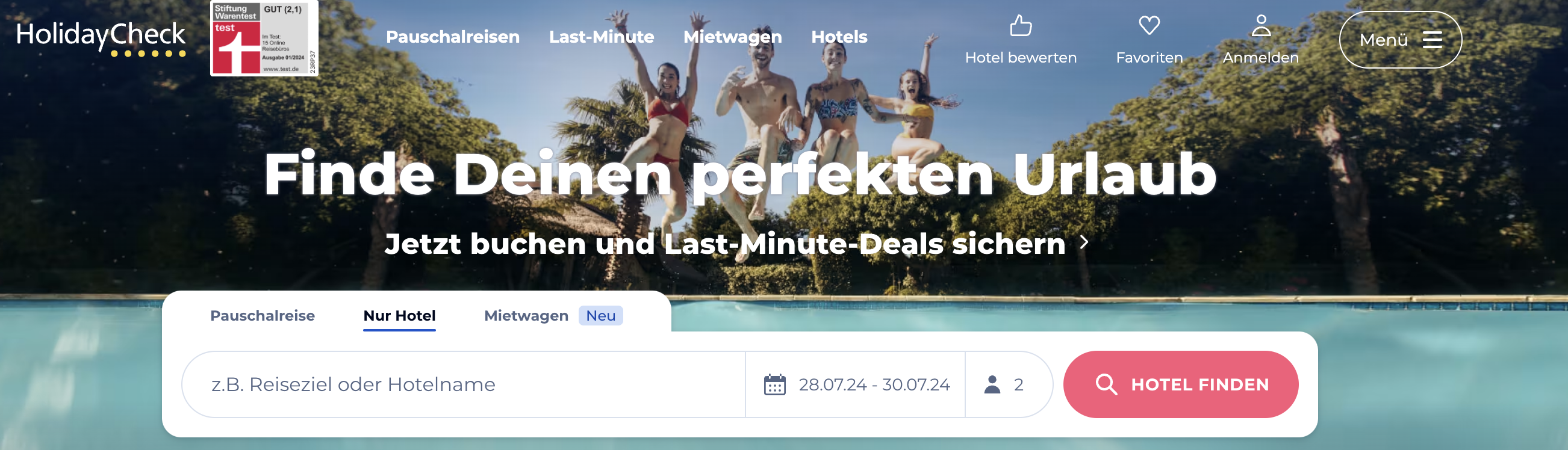
Holidaycheck Hotel Scraper helps you extract hotel listing data from [Holidaycheck.de](https://www.holidaycheck.de), Germany's leading travel review and booking platform.
You can extract detailed hotel information including prices, ratings, reviews, facilities, contact details, and images. The scraper supports both search result pages and individual hotel detail pages, with automatic pagination for large result sets.
### What data can I extract from Holidaycheck.de
| 🔗 Hotel URL |
🏨 Hotel title |
| 💰 Price |
📍 Location & address |
| ⭐ Score & rating |
🌟 Star rating |
| 📝 Review count |
📞 Phone number |
| 📧 Email |
🏷️ Categories |
| 🏊 Facilities |
🖼️ Primary image |
| 📸 Image gallery URLs |
|
### Why scrape Holidaycheck.de
Holidaycheck.de is one of the most trusted travel platforms in the German-speaking market with millions of verified hotel reviews. Scraping Holidaycheck.de can help you:
- Monitor hotel prices and availability across destinations
- Track guest ratings and review trends over time
- Compare hotel facilities and amenities across regions
- Research travel market trends for specific destinations
- Build travel price comparison or aggregation tools
- Analyze competitive positioning in the hospitality industry
### Use Cases
- **Travel Aggregators**: Build or enrich travel comparison platforms with German market data.
- **Market Research**: Analyze hotel pricing, ratings, and availability across destinations.
- **Competitive Intelligence**: Monitor competitor hotels' pricing strategies and guest satisfaction.
- **Lead Generation**: Identify hotels and properties with contact details for business outreach.
### How to use Holidaycheck Hotel Scraper
1. Create a free Apify account using your email
2. Open Holidaycheck Hotel Scraper on the Apify platform
3. Click on the **Try for free** button
4. Enter your search or hotel detail URLs
5. Click on the **Start** button and wait for the data to be extracted
6. Download your data in JSON, XML, CSV, Excel, or HTML
### Input
The actor accepts the following input parameters:
- `startUrls` (array, required) - List of URLs to start the scraping process from. It can be a search or detail hotel URL.
- `maxItems` (integer, optional) - Maximum number of items to scrape.
- `proxyConfiguration` (object, optional) - Proxy settings for the scraping process.
Example with a search URL:
```json
{
"startUrls": [
{
"url": "https://www.holidaycheck.de/dh/hotels-spanien/29ed38c7-75eb-362c-923e-4bab92dd0b22?availability=1&deal=1&p=4&travelkind=package"
}
],
"maxItems": 50
}
```
Example with a direct hotel URL:
```json
{
"startUrls": [
{
"url": "https://www.holidaycheck.de/hi/viva-blue-spa/fd00ef3a-7010-3606-9909-9c7d0f395342"
}
]
}
```
### Output
The scraped data will be saved as a dataset. Each item represents a hotel listing. You can download your data in various formats: JSON, JSONL, HTML table, CSV, Excel spreadsheet, or NDJSON.
Example of the output format:
```json
{
"url": "https://www.holidaycheck.de/hi/iberostar-selection-fuerteventura-palace/fd00ef3a-7010-3606-9909-9c7d0f395342",
"title": "Iberostar Selection Fuerteventura Palace",
"categories": ["Spanien", "Fuerteventura", "Morro Jable"],
"facilities": ["Pool", "Wellness", "Restaurant"],
"price": 2127,
"location": "Pasaje Playa, 1 35626 Morro Jable Fuerteventura Spanien",
"phoneNumber": "tel:+34928541444",
"email": "fuerteventura.palace@iberostar.com",
"score": 5.6,
"stars": 5,
"reviewCount": 5008,
"primaryImage": "https://media-cdn.holidaycheck.com/w_768,h_432,c_fill,q_auto,f_auto/ugc/images/e7b92680-ffa7-48ce-89f5-60bbe5cf87f0",
"imgUrls": [
"https://media-cdn.holidaycheck.com/w_768,h_432,c_fill,q_auto,f_auto/ugc/images/08565038-0926-41a8-8f01-8a72999103a4"
]
}
```
### Need to scrape other travel data?
👉 Scrape HolidayCheck Reviews with [HolidayCheck DE Reviews Scraper](https://apify.com/lexis-solutions/holidaycheck-de-reviews-scraper)
### Limitations
- The scraper is subject to the limitations and restrictions of Holidaycheck.de, including potential rate limits and CAPTCHAs.
- The actor's performance may vary based on the website's response times and structure changes.
### Want something custom-built
This Holidaycheck Hotel Scraper doesn't exactly do what you need? You can always build your own! Lexis Solutions is a [certified Apify Partner](https://apify.com/partners/find). We can help you with custom solutions or data extraction projects.
Contact us over [Email](mailto:scraping@lexis.solutions) or [LinkedIn](https://www.linkedin.com/company/lexis-solutions)
### Support Our Work 💝
If you're happy with our work and scrapers, you're welcome to leave us a company review [here](https://apify.com/partners/find/lexis-solutions/review) and leave a review for the scrapers you're subscribed to. It will take you less than a minute but it will mean a lot to us!
# Actor input Schema
## `startUrls` (type: `array`):
One or more Holidaycheck.de URLs to scrape. Supports both search result pages and individual hotel detail pages.
## `maxItems` (type: `integer`):
Maximum number of hotel listings to scrape.
## `proxyConfiguration` (type: `object`):
Select proxies to be used by the scraper.
## Actor input object example
```json
{
"startUrls": [
{
"url": "https://www.holidaycheck.de/dh/hotels-spanien/29ed38c7-75eb-362c-923e-4bab92dd0b22?availability=1&deal=1&p=1&travelkind=package"
}
],
"maxItems": 12,
"proxyConfiguration": {
"useApifyProxy": true,
"apifyProxyGroups": [
"RESIDENTIAL"
],
"apifyProxyCountry": "DE"
}
}
```
# Actor output Schema
## `overview` (type: `string`):
No description
# API
You can run this Actor programmatically using our API. Below are code examples in JavaScript, Python, and CLI, as well as the OpenAPI specification and MCP server setup.
## JavaScript example
```javascript
import { ApifyClient } from 'apify-client';
// Initialize the ApifyClient with your Apify API token
// Replace the '' with your token
const client = new ApifyClient({
token: '',
});
// Prepare Actor input
const input = {
"startUrls": [
{
"url": "https://www.holidaycheck.de/dh/hotels-spanien/29ed38c7-75eb-362c-923e-4bab92dd0b22?availability=1&deal=1&p=1&travelkind=package"
}
]
};
// Run the Actor and wait for it to finish
const run = await client.actor("lexis-solutions/holidaycheck-scraper").call(input);
// Fetch and print Actor results from the run's dataset (if any)
console.log('Results from dataset');
console.log(`💾 Check your data here: https://console.apify.com/storage/datasets/${run.defaultDatasetId}`);
const { items } = await client.dataset(run.defaultDatasetId).listItems();
items.forEach((item) => {
console.dir(item);
});
// 📚 Want to learn more 📖? Go to → https://docs.apify.com/api/client/js/docs
```
## Python example
```python
from apify_client import ApifyClient
# Initialize the ApifyClient with your Apify API token
# Replace '' with your token.
client = ApifyClient("")
# Prepare the Actor input
run_input = { "startUrls": [{ "url": "https://www.holidaycheck.de/dh/hotels-spanien/29ed38c7-75eb-362c-923e-4bab92dd0b22?availability=1&deal=1&p=1&travelkind=package" }] }
# Run the Actor and wait for it to finish
run = client.actor("lexis-solutions/holidaycheck-scraper").call(run_input=run_input)
# Fetch and print Actor results from the run's dataset (if there are any)
print("💾 Check your data here: https://console.apify.com/storage/datasets/" + run["defaultDatasetId"])
for item in client.dataset(run["defaultDatasetId"]).iterate_items():
print(item)
# 📚 Want to learn more 📖? Go to → https://docs.apify.com/api/client/python/docs/quick-start
```
## CLI example
```bash
echo '{
"startUrls": [
{
"url": "https://www.holidaycheck.de/dh/hotels-spanien/29ed38c7-75eb-362c-923e-4bab92dd0b22?availability=1&deal=1&p=1&travelkind=package"
}
]
}' |
apify call lexis-solutions/holidaycheck-scraper --silent --output-dataset
```
## MCP server setup
```json
{
"mcpServers": {
"apify": {
"command": "npx",
"args": [
"mcp-remote",
"https://mcp.apify.com/?tools=lexis-solutions/holidaycheck-scraper",
"--header",
"Authorization: Bearer "
]
}
}
}
```
## OpenAPI specification
Download the OpenAPI definition: https://api.apify.com/v2/acts/AoOOTobj36yeWrUvk/builds/8fsZgpRx2Rckn2rr1/openapi.json